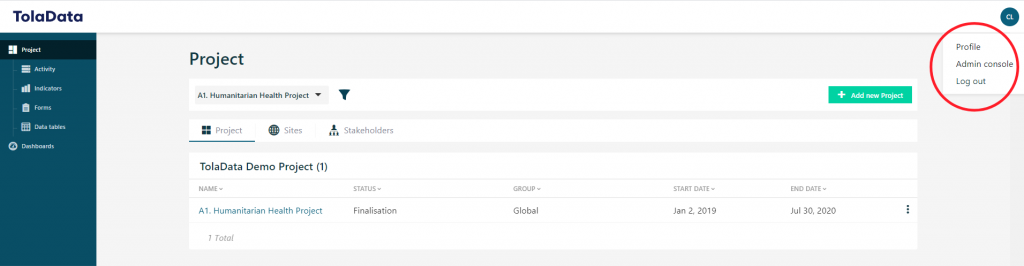
Once your organisation’s TolaData account has been set up, the Org Admin can invite colleagues to join your organisation’s account as users. Simply go to the ‘Admin Console’ by clicking on the round icon on the top right-hand corner of the screen.
Once inside the admin console click on the ‘Users’ tab. Next, select the green ‘Invite users’ button. A pop up will appear and prompt you to enter the email address of the new user that you want to invite.
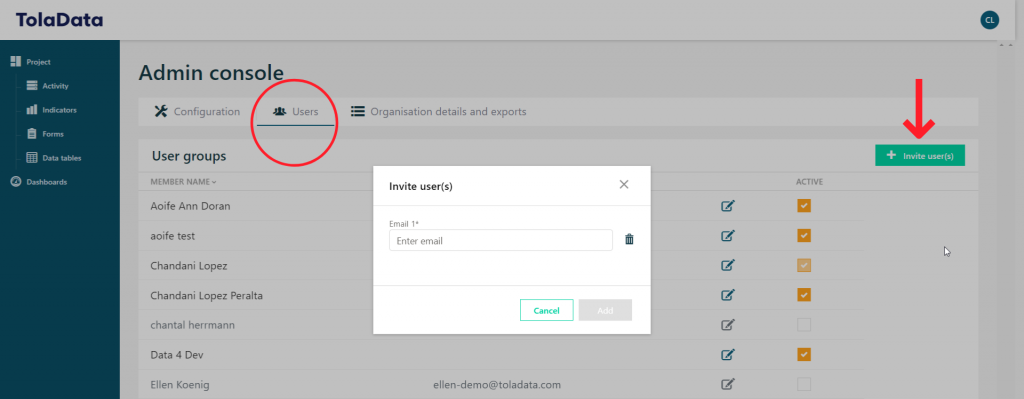
After entering the email address, select add. The invited user will receive an invitation to join the account via email, make sure they keep an eye on their spam folder!

The email will contain instructions on how to set up an account password. After doing so they will be part of your organisation’s account. Free trials are available on request. To arrange one, contact info@toladata.com.